Introduction
The internet has become an essential part of modern life. People use online platforms for communication, education, shopping, banking, entertainment, and professional work. With billions of people connected every day, the digital world offers countless opportunities, but it also creates new risks.
Online safety refers to the practices, tools, and awareness needed to protect personal information, digital accounts, devices, and online identity from threats. Whether you are browsing websites, using social media, making online payments, or communicating with others, understanding online safety helps you make smarter and safer decisions.
Cybercriminals are constantly developing new methods to steal information, spread scams, and access private accounts. However, with the right knowledge and habits, anyone can reduce online risks and enjoy a safer internet experience.
What Is Online Safety?
Online safety means staying protected while using the internet and digital technologies. It includes protecting your personal data, maintaining privacy, avoiding online scams, securing your devices, and understanding how to behave responsibly online.
Many people think online safety only applies to businesses or technology experts, but it is important for everyone. Students, employees, parents, and everyday internet users can all become targets of online threats.
Examples of online safety practices include:
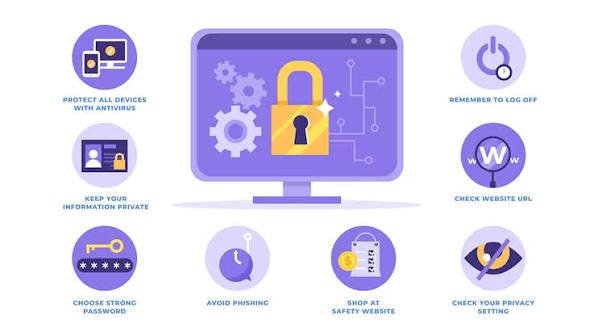
- Creating strong passwords
- Using two-factor authentication
- Avoiding suspicious links
- Protecting personal information
- Updating software regularly
- Recognizing online scams
- Managing privacy settings
- Using secure websites
These simple steps can make a significant difference in protecting your digital life.
Why Online Safety Is Important
The internet stores and shares a large amount of personal information. Names, addresses, financial details, photos, conversations, and work documents are often available through online accounts. If this information falls into the wrong hands, it can lead to identity theft, financial loss, or privacy problems.
Online safety is important because:
1. Protects Personal Information
Personal information is valuable. Cybercriminals may attempt to collect details such as passwords, bank information, or identification numbers. Protecting this data prevents unauthorized access and misuse.
2. Prevents Online Scams
Online scams are becoming more advanced every year. Fake emails, misleading websites, and fraudulent messages can trick users into sharing sensitive information. Learning how scams work helps people identify dangerous situations.
3. Keeps Accounts Secure
Many people use the same password for multiple accounts. If one account is compromised, others may become vulnerable. Good online safety habits help keep digital accounts protected.
4. Protects Digital Reputation
Everything shared online can affect your personal and professional image. Responsible online behavior helps maintain a positive digital reputation.
Common Online Safety Threats
Understanding common internet threats is the first step toward protection. Some of the most common online dangers include:
Phishing Attacks
Phishing is a technique where criminals pretend to be trusted organizations or individuals to steal information. These attacks often appear as emails, messages, or websites designed to look legitimate.
For example, a person may receive a fake message claiming to be from a bank asking them to verify account information. Clicking the link may lead to a fraudulent website that collects login details.
To avoid phishing:
- Check the sender’s information carefully
- Do not click unknown links
- Verify requests for personal information
- Look for unusual spelling or grammar mistakes
Malware and Viruses
Malware is harmful software designed to damage devices, steal information, or monitor user activity. Viruses, ransomware, and spyware are common types of malware.
Malware can enter a device through:
- Unsafe downloads
- Suspicious email attachments
- Fake software updates
- Infected websites
Keeping security software updated and downloading files only from trusted sources can reduce the risk.
Identity Theft
Identity theft occurs when someone uses another person’s personal information without permission. Criminals may use stolen information to open accounts, make purchases, or commit fraud.
Protecting personal details and monitoring online accounts are important steps in preventing identity theft.
Online Harassment and Cyberbullying
The internet allows people to communicate easily, but it can also be misused. Cyberbullying and online harassment can affect mental well-being and personal safety.
Safe online behavior includes:
- Reporting harmful content
- Blocking abusive users
- Avoiding unnecessary arguments
- Protecting private information
How to Improve Your Online Safety
Improving online safety does not require advanced technical skills. Simple daily habits can provide strong protection.
Use Strong and Unique Passwords
A strong password should be difficult to guess. Avoid using common words, birthdays, or simple patterns.
A good password usually contains:
- Uppercase letters
- Lowercase letters
- Numbers
- Special characters
Using a different password for each account reduces the damage if one account is compromised.
Enable Two-Factor Authentication
Two-factor authentication adds an extra security layer. Even if someone obtains your password, they may still need another verification method to access your account.
Many services provide authentication through:
- Mobile apps
- Security codes
- Fingerprints
- Physical security keys
Keep Devices Updated
Software updates often include important security improvements. Ignoring updates can leave devices vulnerable to known threats.
Regularly update:
- Operating systems
- Web browsers
- Applications
- Security software
Be Careful With Public Wi-Fi
Public Wi-Fi networks in places like cafes, airports, and hotels may not always be secure. Avoid accessing sensitive accounts when connected to unknown networks.
If you must use public Wi-Fi:
- Avoid financial transactions
- Use secure websites
- Consider using a trusted VPN service
Online Safety: A Complete Guide to Staying Protected in the Digital Age
Online Safety for Children
Children are among the most active internet users today. They use digital devices for learning, games, social media, and communication. While the internet provides valuable educational opportunities, children can also face online risks if they are not guided properly.
Parents and guardians play an important role in teaching children about responsible internet use. Online safety education should begin early so children understand how to recognize dangers and make better decisions online.
Common Online Risks for Children
Children may experience different types of online threats, including:
Inappropriate Content
The internet contains a large amount of information, but not all content is suitable for children. Without proper supervision, children may accidentally access harmful or inappropriate material.
Parents can help by:
- Using parental control tools
- Setting safe browsing rules
- Discussing online experiences openly
- Teaching children how to report harmful content
Online Predators
Online predators may attempt to build relationships with children through games, social media, or messaging platforms. They may use fake identities to gain trust.
Children should learn:
- Never share personal information with strangers
- Avoid private conversations with unknown people
- Tell a trusted adult about uncomfortable interactions
Cyberbullying
Cyberbullying involves using digital platforms to hurt, threaten, or embarrass someone. It can happen through social media, online games, or messaging apps.
Signs of cyberbullying may include:
- Emotional changes after using devices
- Avoiding online activities
- Fear of checking messages
- Sudden changes in behavior
Encouraging children to communicate openly can help identify problems early.
Online Safety and Social Media
Social media platforms allow people to connect, share ideas, and build communities. However, sharing too much personal information can create privacy and security risks.
Protecting Privacy on Social Media
Users should carefully manage what information they share online.
Avoid publicly sharing:
- Home addresses
- Phone numbers
- Financial information
- Personal identification details
- Private family information
Adjusting privacy settings can help control who can view posts, photos, and personal details.
Think Before You Post
Content shared online can remain available for a long time. Even deleted posts may exist through screenshots or saved copies.
Before posting anything, consider:
- Could this information harm my privacy?
- Would I be comfortable if others saw it?
- Does this represent me positively?
Responsible posting helps maintain a safer digital presence.
Online Banking Safety
Digital banking has made financial transactions faster and easier. People can pay bills, transfer money, and manage accounts from anywhere. However, online banking also attracts cybercriminals.
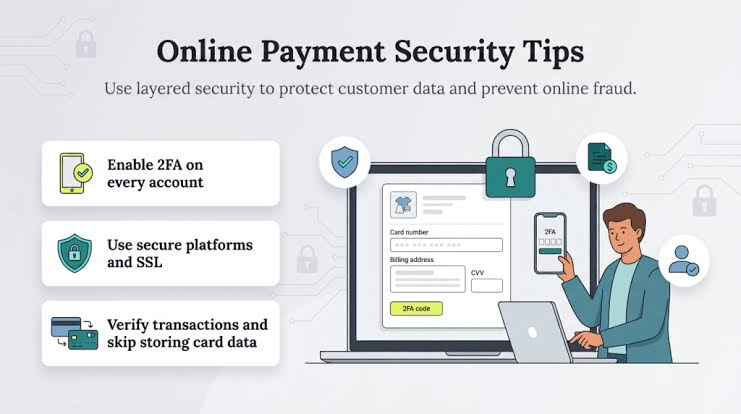
Tips for Secure Online Banking
Use Official Banking Apps
Always download banking applications from official sources. Avoid installing apps from unknown websites because they may contain harmful software.
Avoid Sharing Banking Information
Banks will never ask customers to share passwords, PIN numbers, or security codes through unexpected emails or messages.
Never share:
- Online banking passwords
- Verification codes
- Card details
- Security answers
Monitor Account Activity
Regularly checking bank statements can help identify suspicious transactions quickly.
If you notice unusual activity:
- Contact your bank immediately
- Change account passwords
- Review recent transactions
Online Shopping Safety
Online shopping has become extremely popular because it provides convenience and access to millions of products. However, shoppers need to be careful when providing payment information.
How to Shop Safely Online
Use Trusted Websites
Before purchasing from a website:
- Check customer reviews
- Verify website security
- Research the seller
- Avoid unrealistic offers
Look for Secure Connections
Secure websites usually use HTTPS and display security indicators in the browser.
Avoid entering payment details on websites that appear suspicious or poorly designed.
Be Careful With Deals That Seem Too Good
Scammers often create fake stores offering expensive products at extremely low prices. These websites may steal payment information or send fake products.
Always research before making a purchase.
Email Safety Tips
Email remains one of the most common methods used by cybercriminals. Many attacks begin with a simple email containing a harmful link or attachment.
How to Identify Suspicious Emails
Warning signs include:
- Unknown senders
- Urgent requests
- Unexpected attachments
- Requests for passwords
- Fake rewards or prizes
Before clicking anything, verify the sender and check whether the message is genuine.
The Role of Cybersecurity Tools
Technology can help users improve their online safety. Security tools provide additional protection against many digital threats.
Useful cybersecurity tools include:
Antivirus Software
Antivirus programs help detect and remove harmful software. They can protect devices from viruses, spyware, and other threats.
Password Managers
Password managers help create and store strong passwords securely. They reduce the need to remember multiple complex passwords.
Virtual Private Networks (VPNs)
VPNs can help protect internet traffic, especially when using public networks. They provide an additional layer of privacy by encrypting online activity.
Online Safety for Businesses
Businesses depend heavily on digital systems for communication, payments, and operations. A security breach can cause financial damage and harm customer trust.
Companies should focus on:
- Employee cybersecurity training
- Data protection policies
- Regular software updates
- Secure backup systems
- Access control management
Employees should understand how to recognize phishing attempts and handle sensitive information responsibly.
Creating a Safer Digital Future
The future of technology will bring new opportunities and new challenges. Artificial intelligence, smart devices, and connected systems will continue changing how people interact with the internet.
Maintaining online safety will require:
- Continuous learning
- Responsible technology use
- Strong privacy awareness
- Improved cybersecurity practices
Every internet user has a role in creating a safer online environment.
Frequently Asked Questions (FAQs) About Online Safety
1. What is online safety?
Online safety means protecting yourself, your personal information, devices, and digital accounts while using the internet. It includes safe browsing habits, strong passwords, privacy protection, and avoiding online threats such as scams and cyberattacks.
2. Why is online safety important?
Online safety is important because people share a lot of personal information on the internet. Without proper protection, users may face risks such as identity theft, financial fraud, account hacking, and privacy violations.
3. How can I protect my personal information online?
You can protect your personal information by using strong passwords, enabling two-factor authentication, avoiding suspicious links, limiting what you share publicly, and using secure websites when entering sensitive details.
4. What are the most common online safety threats?
Some common online safety threats include phishing emails, malware, viruses, identity theft, fake websites, cyberbullying, online scams, and unauthorized access to personal accounts.
5. How can I create a strong password?
A strong password should be unique and contain a combination of uppercase letters, lowercase letters, numbers, and special characters. Avoid using easily guessed information such as names, birthdays, or common words.
6. What is two-factor authentication and why is it useful?
Two-factor authentication adds an extra layer of security by requiring a second verification step after entering a password. This makes it harder for hackers to access your account even if they know your password.
7. How can parents keep children safe online?
Parents can help children stay safe online by teaching responsible internet use, setting privacy controls, monitoring online activity, discussing internet risks, and encouraging children to report uncomfortable situations.
8. Is public Wi-Fi safe to use?
Public Wi-Fi can be risky because some networks may not be secure. Avoid accessing sensitive accounts such as banking services on unknown public networks and use additional security measures when possible.
9. How can I identify an online scam?
Online scams often include suspicious messages, unrealistic offers, urgent requests, unknown links, and requests for personal or financial information. Always verify information before responding.
10. What should I do if my online account is hacked?
If your account is hacked, immediately change your password, enable two-factor authentication, check account activity, remove unknown devices, and contact the service provider if necessary.
11. How does online safety protect businesses?
Online safety helps businesses protect customer information, financial data, company systems, and reputation. Strong cybersecurity practices reduce the risk of data breaches and cyberattacks.
12. Can antivirus software improve online safety?
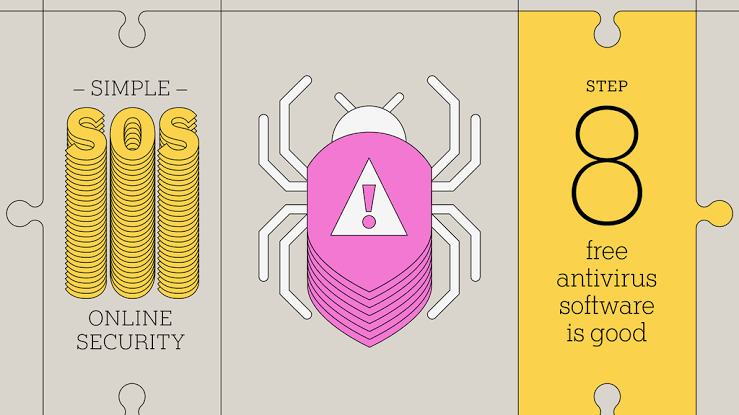
Yes, antivirus software can help detect and remove harmful programs such as viruses, spyware, and malware. However, it should be combined with safe online habits for better protection.
Conclusion: The Importance of Online Safety in Today’s Digital World
The internet has transformed the way people communicate, learn, work, and manage their daily lives. While digital technology provides countless benefits, it also introduces security challenges that require awareness and responsible behavior.
Online safety is no longer optional; it is an essential skill for every internet user. From protecting personal information and securing online accounts to avoiding scams and maintaining privacy, small security steps can create a much safer digital experience.
Everyone can improve their online protection by following simple practices such as creating strong passwords, using two-factor authentication, updating devices, avoiding suspicious links, and thinking carefully before sharing information online.
As technology continues to develop, cyber threats will also continue to evolve. Staying informed and practicing safe internet habits will help individuals, families, and businesses confidently navigate the digital world.
A secure online environment begins with responsible users. By making online safety a daily priority, we can enjoy the advantages of the internet while reducing the risks that come with being connected.